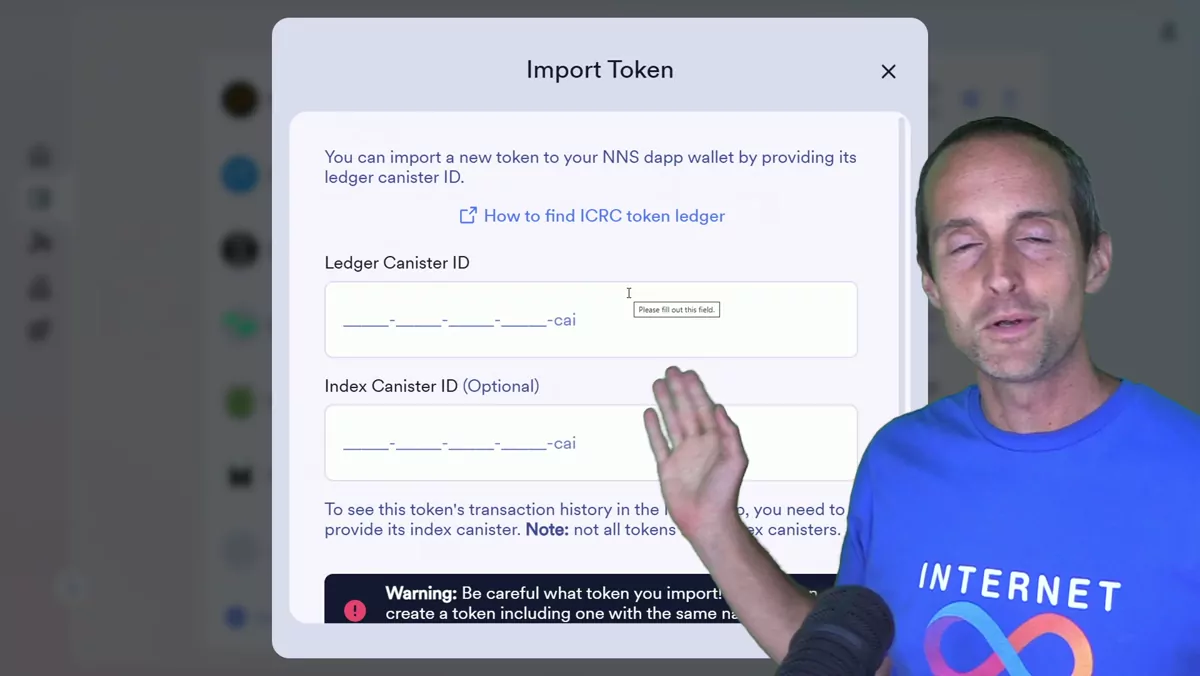
This is a short and practical tutorial where I show you how to import a token that is not on the SNS, the service nervous system on Internet Computer Protocol, into the NNS, the network nervous system. You do not need to do this if a coin is already on the SNS, like OpenChat, Trax, or WaterNeuron, since those do not need to be imported. But if you want to import and hold tokens that are not on the network nervous system, this is how you do it. I am not a financial advisor and this is not financial advice. What I am going to do is import the JBBJ meme coin I made.
Getting to the NNS app
To get to this, you need to go to nns.ic0.app, which you can reach from the official internetcomputer.org website. Go to "Use," then "NNS and staking," and that will take you directly to the app. To import a token, you can either click "View tokens" or click on "Tokens." Your SNS tokens will appear at the top. To import something, scroll all the way to the bottom and click "Import token."
Finding the ledger canister ID
To import, you need to find your ledger canister ID. It looks like most of the tokens on bob.fun, at least, do not seem to have an index canister ID, which is unfortunate. There are a few different places to find the ledger canister ID. For example, with JBBJ, you can go to info.icpswap.com. From the start, if you go to info.icpswap.com you could click on "Swap" and then go through and find the specific token you are looking for, then click on that coin. Or, if you already know the coin, you can go to swap, search for JBBJ, wait for it to load, then click on the listing and copy it.
I will also put JBBJ specifically on my website, because if you use IC Explorer this is a bit easier. If you go to icexplorer.io, you can search JBBJ and you will see the same one, but for some reason there are two different listings. There is one that is the correct one, and the ledger ID is right there in the upper right. I click to copy that ledger ID. IC Explorer is probably easier. You can see ICPSwap still loading, but if I click into it there, the same ledger ID is right there too.
Importing the token
I will go over to import the token, scroll all the way down to the bottom on the NNS, and click "Import token." Then I paste the canister ID right there. I click "Next" and it verifies the token details. I am not going to be able to have my transaction history, unfortunately, but make sure you do see the expected name, abbreviation, and image. Then I click "Import." Now you can see in my tokens that this is an imported token.
If you go into the import tokens help on Internet Computer Protocol, these have to be ICRC1 or ICRC2. You can find the ledger, and they give you some additional options like the dashboard, NFT Geek, and so on. It also shows you that if you delete the token, you can add and remove tokens at any time. But keep in mind it does not remove the asset itself. So even if you removed it and added it back, the token stays in your wallet, which is great.
Sending JBBJ from OpenChat to the NNS
Now I am going to send some of my JBBJ from OpenChat, because I have a lot of it: 16 million, worth a thousand ICP plus, sitting in my wallet. I want to send some of it back to the NNS. To do that, I go up here and copy my principal ID, which you can also do by clicking "Receive." This is my JBBJ address. Then I go to OpenChat, and if I paste this, you will see it is the same principal that all my other stuff uses.
I will send a small test transaction to make sure this works correctly. Always send a small test transaction to make sure it works correctly. It pains me to hear that some of you have lost thousands of dollars because you did not send a small test transaction to make sure it worked. If you'd rather walk through steps like this so you can ask your questions as they come up, you can set up a call with me and ask me on our call. So now I have sent a small test transaction. I have a few tabs open, so I go back to get it to refresh. Now that JBBJ has been imported, it is not going to show zero. What is awesome is that it does actually have the balance correctly on here. I do not have my transaction history, which is unfortunate, but in theory I could add an index canister at some point.
Now you can see the actual balance in my wallet, and I would rather hold the imported JBBJ in here so I can show it off in my wallet. So let's send a bigger transaction. We will send about 5 million of it over there. If that works, then we will send some more. This way I can see it in my portfolio, and if anything happens with OpenChat, I do not also lose my JBBJ. Though if something happens with OpenChat, it is probably going to be at least my own issues, right?
Now we can go back to the portfolio, and it actually displays the JBBJ in my list of tokens. I want to make sure to leave enough in OpenChat. I want to leave a lot in there so I can just click back to my main chat wallet or paste back here again. I still want to leave several million more in OpenChat for giveaways and things like that. So we will send 8 million more out of the OpenChat wallet. This is how I transfer larger amounts of crypto multiple times to make sure it works. Now I have only 251 ICP worth of JBBJ left in OpenChat, and if we go back to my NNS and refresh, we can see my JBBJ listed right there with my OpenChat up at the top in value. That is nice, because then I can show my little meme coin off easily.
Why I prefer holding on the network nervous system
That is exactly how you import tokens. According to the documentation, if I were to delete the token and add it back it would still be there, which is good. I prefer to hold my tokens as much as possible on the network nervous system. In my experience it is the most guaranteed, reliable environment. I originally recorded this during an ICP crypto live stream on my Jerry Banfield Live channel and clipped this part to share here, and I am starting to put together more ICP playlists, including my ICP Crypto playlist, so you can find all kinds of videos like this one.