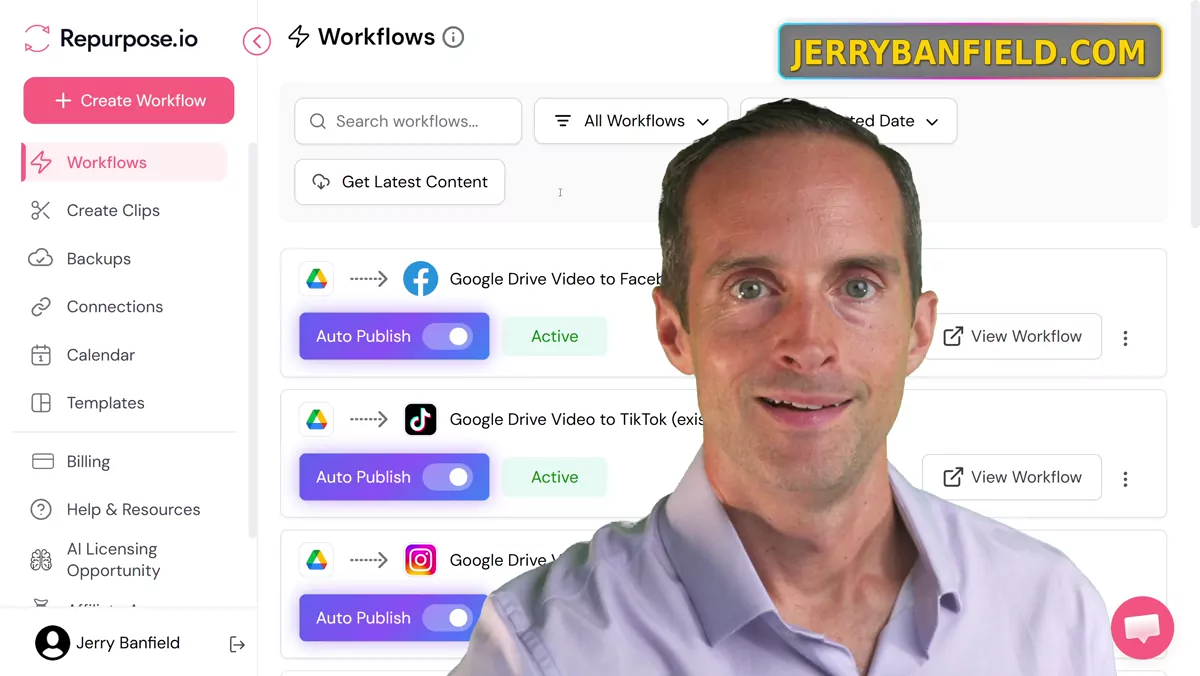
If you're a content creator, you need to be using Repurpose.io, because what I'm able to do is automate publishing of my videos to other platforms. This is what most creators are not doing well: publishing to multiple platforms while saving time and energy. I'll show you my automations in here.
And if you want to try this, go to the resources page on my website and I've got an affiliate link to Repurpose.io. They have an affiliate program which you can get 25% commissions on, but I use this because the utility is massive. I've got the like $700 and some dollar a year plan.
What These Automations Actually Do
Look what I'm doing with this. I'm dropping a video in a Google Drive folder and then firing it out automatically to Facebook. Same thing for TikTok, same thing for Instagram. But not only that, I have four different accounts that this is firing content out to. I mean, do you see this? Do you see all these automations? This is hundreds and hundreds of videos that I'm publishing. I'll show you exactly how I'm doing this.
So here's my Jerry Banfield Show Instagram account. These are the same YouTube Shorts that I will put up on YouTube, and it's a nightmare trying to publish every one of these videos and upload them manually. But with Repurpose.io, I'm just cranking out videos to Instagram. And like, this one got three likes. It doesn't matter. It doesn't matter how many likes or views they get. These are free views. These are just extra views I'm getting for nothing.
So then I have a Jerry Banfield Show Facebook page, and I fire the exact same videos out to this Facebook page automatically. And on Facebook, I upload my long form vertical videos too. I'm getting more free views doing this. If you switch and you see my insights, for example, right now I get most of my views on YouTube, but this is just giving me extra reach for nothing. Right now I've got 2,000 views in the first week of doing this on Facebook. Four hours of watch time. And I cranked out eight videos in one day. Most of the views are from non followers. This is a brand new Facebook page. Every single reel I'm posting is getting hundreds of views. And this is fully, fully automated. I don't have to do anything except drop the videos into a folder.
Now we can look at TikTok. Exact same thing on TikTok. I posted a couple of these videos manually with hashtags. I'm going to make my workflow with AI that I use to take my long videos like this and turn them into shorts, and then I'm going to have the AI output hashtags for these platforms as well. But even without using hashtags, just firing out videos with watermarks, I'm getting hundreds of views on every video on a brand new account.
Why I Split It Across Four Accounts
And then I have that across four different accounts, because you don't want to put videos about different topics on the same account. These are all crypto videos on this account. Then this Instagram account is all content for content creators. Then this Instagram account is all dating videos. So then the algorithm can lock in and figure out what kind of content it is. Then I'm doing the same thing on TikTok. I've got an Instagram account, this is my ICP crypto. Again, hundreds of views across these videos, thousands of views total, absolutely free views that I didn't have time for before using automation.
Then my creators channel, exact same thing, less views on this. But again, it's niche. And somebody finding me and going to my website can be worth hundreds of views, if not thousands of dollars, off of just one of these videos. And it takes no extra effort. Then I have Jerry Banfield dating on TikTok. Same thing, just firing off these videos, getting free views, same story on Facebook and with the exact same channels. So Repurpose is what has allowed me to do this, because it takes way too long to upload all this stuff manually.
How the Workflow Is Built
Now, what do these workflows look like? Well, if you want to create a new workflow on Repurpose, what I do is I do past content, but you can also do things like take videos directly from TikTok and send them to YouTube, et cetera. There's all kinds of different workflows they have. What I do is I use Google Drive, and I drop videos in my Google Drive folder. And then I pick an account to send everything out on.
Then I click next. Right now, while I've got a backlog of content, I'm posting the maximum five times a day. And I'm posting the oldest first, that way if I drag a new video on there — but maybe at some point I'll switch to newest first. Right now this guarantees my videos go out in the order I drag them in, so the new videos will go out later. Then you can pick your times. I just leave it by default at this point.
Then I have my Google Drive, I pick the right Google Drive folder. I've got six YouTube channels, or maybe I have less Google Drive folders than that. I've got like four Google Drive folders that I have set up in here, so there's five of them: my creators, my Crypto Reviews, my dating, my ICP, and my vlogs. My ICP and my Crypto Reviews both fire out to the exact same crypto accounts, but then the others go out separately. So all I have to do is pick a Google Drive folder, pick an account, and I literally click create workflow, and it starts firing the videos out like this. This is crazy. I needed this so bad. Before, I used to manually upload, and just the time it took to manually upload is crazy, just having to drag all these files.
Now, you want to make sure you're careful. If you pick something incorrectly in your workflow — like I accidentally one time put it at the top level Google Drive folder, and that could have just fired out God knows what would have came out of that. So you're going to make sure you make dedicated folders for this and then publish straight from those folders. You don't want to just crank out your personal videos all over the place. So with automation you do need to be careful.
And I have auto publish on, so it just keeps putting content out. Then once the content has got going, you'll see auto scheduled, and then you'll see when it was published, so you can verify it was working. I'm not sure why some of these don't seem to be going out — maybe the title is too long, or there's some error. Some posts don't seem to be going out for some reason, but most of the time most of the posts seem to be going out successfully with no issues. So this is just continually cranking out content.
The Difference Between an Amateur and a Professional
What's going to happen over time is that I'm going to build momentum on all of these accounts. That is right now 12 accounts that I wouldn't have time to post to manually. Those accounts can help feed my other accounts. I'll probably put hashtag Jerry Banfield in the little text file that I'm going to crank out with AI, so that all my videos across all my accounts on all my platforms will help promote each other. So if somebody watches a dating video, they might discover my vlog channel. Or if somebody watches a vlog, then they could end up discovering the crypto channel. And if they're a content creator and they find me that way, then they can get back into the vlogs and the dating videos.
Any videos that do well potentially bring more views to all my accounts on all those platforms. The algorithm knows exactly what kind of content it is. It knows my audience is crypto, or content creators, or people that are interested in dating, or just vlogs. It's got everything it needs to promote me. And this to me is the difference between being an amateur and a professional. Amateurs don't have stuff like this set up. Professionals get stuff like this set up.
Then I bring everybody everywhere back to my website, because my website has my YouTube channels, and my website has these accounts linked on it also. And what's cool is this just gives me so many more opportunities to get discovered. Then when somebody discovers me on Instagram, comes to my website, subscribes to my YouTube channels, it all fuels itself.
So I've got proof right here that I've shown this is working on brand new accounts. I've brought in probably a little less than 10,000 views across these accounts all total, in the first week of doing this, on all brand new accounts, on videos that are literally — these aren't viral videos. These are just me talking head, just like this. And I create these, I don't even film dedicated shorts, I don't even pay anyone to edit. I just drop my long form videos, and I record them horizontal, which I show in some of my other videos. Then I just have the AI take clips out, take shorts out, and then I just drop those shorts in a folder. This is an insane workflow process.
If you want to see the rest of how I run the channels, I keep all of it in my YouTube Coaching playlist.
So if you want to make content creation easier for you, if you want to figure out things you can do like this, go to my website and schedule a call with me.
I'm here to support you in being a full time content creator, and with dating, and with crypto, and I make entertaining vlogs.
You can also talk with me there directly whenever you want.
And the thing I'd point you to most is the community itself, because that's where the questions get answered and the workflows get shared instead of sitting in one person's head.
Come schedule a call with me and post and ask questions.
So thanks for watching, and I hope to see you at jerrybanfield.com.