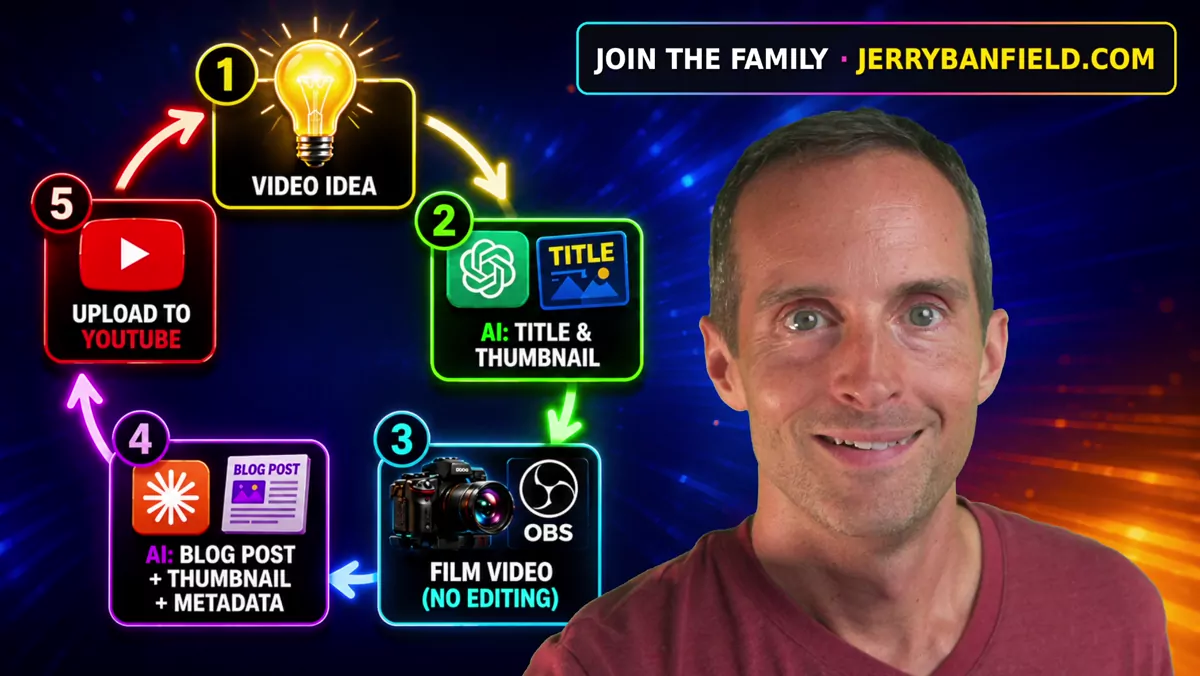
This is the best AI YouTube video creation workflow in the world if you want a real human presence in your videos — not some faceless slop channel — if you want real human videos that are created with heart and soul, that will bring people together and build community. I challenge anyone else: make a video if you have a better workflow than this, because this is better than I've ever seen anybody teaching before. This workflow allows me to take a video idea and turn it into a polished YouTube upload with a surprising amount of depth, rapid speed, and higher quality. So much higher quality than I used to do in the past, in so much less time. This workflow is super easy. It uses ChatGPT, Gemini sometimes, and Claude. And the result is that all I have to do is step up and talk in OBS in my studio, hit record, talk, and go through this process — and almost everything else is taken care of by AI. So I'll show you, on a couple of videos, exactly how I did this.
I help YouTubers who want to make more money off the views they have and to work smarter. I've been on YouTube since 2011. I had more subs than Mr. Beast in 2015 and 2016. I've got a deep level of experience, and we can set all of this up together on a call and do more in less time at higher quality. So let me show you.
Six Channels, Six Videos a Day, in About Three Hours
Here's a recent dating video I filmed — you've got everything you need in there. I have six YouTube channels a day, and I'm able to crank out six videos a day in about three hours a day or so of real time. I often am talking for over an hour of that actual time. My videos are often 10 minutes or so, even longer sometimes on average. In fact, I have a spreadsheet to track all of this in Microsoft Excel, going back to May 18th, when I started the spreadsheet after I came back to YouTube again. I've published 303 videos, averaged about 5 a day — I tried live streaming for a little while, which is why I did a few less. I've averaged 67 minutes a day of live and recorded videos combined, and that's a total of 61 hours of video I have cranked out in the last 55 days. So I'm cranking out over an hour of video every single day, and it's this workflow that makes it so amazingly easy. Let me show you what I just did on the last version of this.
From Idea to Title and Thumbnail with ChatGPT
What I do is I just have video ideas — a video idea that I'd like to make a video about. I'll show you how I get all these ideas, and I'll wrap that up at the end. Here's a video idea I had: I get my phone out, I have the ChatGPT app on my phone, and I just dictate what I'd like a video to be about. What I use ChatGPT for is to identify the hook, the best way to present what I'm trying to say, and the best titles and thumbnail ideas. So I created a video called "Dating Is Hard Because You're Looking for an Exception," which I released on my dating channel. ChatGPT comes up with a title based on the idea I have. Then I ask it for thumbnail ideas and key points, and I ask it to give me some feedback about the things behind my idea, just to generate some material for me to talk about.
Then I ask it to come up with a thumbnail idea, and I go back and forth on it until I have a thumbnail idea, and I go through until it generates a thumbnail. It often gets it right on the first try — and that's exactly how the thumbnail for my last dating video came out.
Then I have an overlay on top of my videos that I also generated with ChatGPT. In my recent videos I showed how most YouTubers waste their impressions — every one of my videos will have between a one and ten percent click-through rate. So on every one of my thumbnails, I just overlay this on the top to brand my website over and over again, because it doesn't seem to impact the click-through much, but it does increase the odds that somebody will go to my website substantially. So I get that background set up in OBS.
In addition to that, I ask ChatGPT to lay out some more ideas based on what I'm talking about. That way it just throws some of these ideas into my head — but usually I talk off the top of my head. I've tested having ChatGPT do entire viewer outlines, and while that makes sense for a deep, detailed subject like cryptocurrency reviews, where I want to make sure I hit every single point, cover the facts, and go over all kinds of different research, with something like a dating video it's actually better if it comes off the top of my head, because it's more heartfelt and authentic. So on this one, I just looked at a couple of the ideas and then didn't do much else with all the rest of the information it gave.
Claude in the Command Line on Ubuntu
Once I did that, the next thing that happened is that right there in ChatGPT, I immediately got the idea for my next video. As soon as I finished filming the dating video, this time on my computer, I used my microphone to begin dictating the next idea, to show off this workflow. And at the same time I did that, I have four Claude windows open in Ubuntu. If you want to get started and really take your AI workflows to the next level, having Claude or ChatGPT installed in the command line on Ubuntu is where you do that. That's not some big scary thing — it's something you can get done. You can even just talk to Claude or ChatGPT and it'll talk you all the way through the process, which is how I did it myself. And if you want help with that, that's something we can walk through together on a one-on-one call.
Here's what I'm doing at the same time: as soon as I finish filming that dating video, I go to a folder on my computer where I record everything — This PC, Windows C, Recordings. These are all the videos I've filmed in the last few days, including the last one, "Dating Is Hard Because You're Looking for an Exception," a 19-minute video. I just drag that into my "long videos in" folder. Then over in Claude, I have the command line set up so all I have to do is talk to Claude in plain language. At the higher level, when I'm up one level in the website folder, I have Claude set up in the command line to deploy my website. All I have to do is go into that folder on Ubuntu — just change directory, copy and paste, and put in the Claude projects website path, or I can even do it in the top projects folder — and I deploy straight to my website. But I'm getting ahead of myself.
So the first thing: I have an idea in my head, I talk it out with ChatGPT and get a thumbnail, an outline, and the title. Then I film the video, and I have a setup where I literally just push a button — you can look for my Jerry Banfield OBS equipment video. This is why you want to book a call with me: you can just ask your questions without having to take all this other time to look stuff up. I've already got a video or something that covers it, and you can DM me — it speeds up everything a lot. So I film the video just by hitting record and talking off the top of my head. From practice, I've done this so long that I can talk through a 20-minute video — I can talk through a five-hour stream — straight off the top of my head. I talk, I hit record, and then I drop it in the folder.
Why I Put Everything on My Own Website
Now, I'm getting three things out of Claude in the command line at the same time, and I'll explain why I'm doing this, because it's really important — especially coming from the guy who deleted all my videos. I deleted everything online last year. I got so burned out, my life kind of spiraled, and I got divorced around the same time. I just kind of burned my whole life down and I'm rebuilding fresh. Well, one big thing I learned from that is you need content that you control online.
On my website, I have a gigantic blog — I probably should put the link back at the top instead of making people scroll all the way down. The video I just filmed is already live as a blog post on my website. I have 942 blog posts. And there it is — the exact thumbnail, the same shirt. It's literally the exact video I just filmed, transcribed and written out as a blog post, with everything I said linked exactly where the links fit: a link to my dating playlist, a link to the Jerry Banfield Skool, another link to the Skool, and more blog posts right before it. Right before that one, I filmed a 30-minute crypto video, and right before that I did a video on why I pay $400 a month for ChatGPT and Claude — it didn't get the first thumbnail just right on that one, so the eyes look kind of shut.
I've got all this set up because it makes my content fully under my control. I can't get canceled on this website — it's hosted on ICP, the blockchain decentralized infrastructure. I can't get canceled, this content is evergreen and permanent on there, and I control every link and can change it any time I want to.
So after I film a video, I take the MP4 and drop it in. I also have a video showing all my OBS settings, so you can see exactly what I set everything to in OBS to make the videos come out looking beautiful. I have my exact PC listed in my equipment video, showing you why I have a $2,000 gaming PC I bought a few months ago. It cranks out the videos, and a quality PC is important for helping Claude run through command line work like transcription, which uses your graphics card to go faster.
One Command Does Almost Everything
So I drop a video in this folder, and then all I do in the command line to continue is type "/longvideos." That's all I have to do. I have auto mode turned on in Claude, so I don't have to approve everything — if you hit shift-tab, you can cycle from manual mode, where you have to go through and approve every single thing, to accept edits, to auto mode. I put auto mode on, so it just goes through and does everything without asking me. It's not the dangerous mode where things really get crazy — this just goes through, does everything, and then tells you if there are any issues. This whole run took six minutes.
What I usually do is film a bunch of videos at a time and just rip through this process over and over again with a whole bunch of videos in a row. While I was filming the dating video, Claude was processing the crypto video. So as soon as the dating video is done, I drop the dating video in, and then I take the metadata.
Claude has three jobs here, and I set this all up custom — I used Fable to go in there and build this entire workflow and build my entire website out on the blockchain. Claude controls my entire website and updates my website. I don't have to pay for WordPress or Kinsta hosting or anything else. I put it straight on a blockchain, and it's almost free to host. I've got a guide I'll share on a call with me for exactly how to get your website mapped out with Claude in the command line interface and get it on ICP.
So I drop a video in, and it creates a blog post. It pulls the first frame of the video out as a thumbnail — which is funny when I can't manage to remember that it's going to use the first frame and that I should be looking at the camera as soon as I punch record on my Stream Deck XL. I drop the video on Claude, and it cranks out a blog post on my website, it cranks out a thumbnail, and it cranks out a metadata file.
The Metadata File: Timestamps, Entities, Playlists, and 25 Titles
The metadata file comes out as a text file. It has exact timestamps for my videos and an exact description. Since YouTube uses these to categorize everything in videos — it goes through your video and picks out specific topics you're talking about, which could be called entities — I tell Claude to go through and identify the specific entities I'm talking about. That gives my videos the ability to go out on all the specific terms I exactly mentioned. I used to put like 20 timestamps in there, and — stop. I'm doing a 20-minute video; we don't need to break it down every 30 seconds. So I got it down to where it breaks it up automatically and does between five and ten timestamps per video.
Then, for every single video, based on the type of video, it dynamically links the playlists in the correct order: dating first, then life, then games, then YouTube coaching, and the crypto stuff after that. Below that it has tags I automatically copy and paste. Then it outputs titles, usually starting with the one from the file name, and it comes up with 25 total titles — the one I started with, with fixed capitalization if I flubbed it, and then other titles. Most of the time I use the title I came up with already, because I already thought of it, filmed the video off it, and had ChatGPT work on it. But in this case, I actually picked one of the other titles it generated based on what I actually said in the video — I looked at it and thought, that's actually better. So I used one of those titles. The creative titles are usually just for inspiration — like "An Hour of Dishes a Day Taught Me What I Want in a Wife." We're not going to use that one here, but sometimes this gives me additional video ideas too. Then at the bottom, there's a compliance review. It scans to make sure that my video should be able to be monetized, that it shouldn't be shadow banned, and that it's going to pass the community guidelines.
Gemini as My Safety Check Before Uploading
I also use Gemini sometimes to take the raw transcript out and paste it in, because occasionally — it most recently happened on the dating channel — occasionally your boy will come out here and say some crazy stuff and not realize it. I'll paste the transcript into Gemini, and Gemini is like, "Easy, buddy, easy. Why don't you refilm that video?" I have the $100-a-month Gemini plan too, and you get 20 terabytes of storage with it, which is great for storing all the videos. Claude produces the full transcript fast — it uses the graphics card to transcribe everything before it gets into the blog post authoring — and I just paste that full transcript into Gemini.
Out of my recent videos, I had one dating video called "How I Invite a Woman to Approach Me Without Saying a Word." The original way I filmed it, Gemini didn't think it was a good idea to put the original one out. That original version is still out there as a blog post, but I deleted the original video off YouTube before I published it, refilmed it, and it came out a lot better. I do this check first, before I even upload, to proactively make sure I don't upload something that violates community guidelines and to make sure everything came out all right.
Endless Video Ideas Across Six Channels
Then, after all this is done and I've got the video uploaded, going through this process generates additional video ideas for me. In the context of looking at the video ideas in Claude, uploading the video, seeing what other people are saying, and going back and forth with ChatGPT, I practically have endless video ideas for six different channels that I can constantly crank out every day. And this entire process is rapid and scalable. I'm getting Google organic search traffic — people coming straight to my website and finding me. I'm consistently getting more people to join the Jerry Banfield Family from five different subjects. Well, I don't know if anybody's joined from the gaming channel yet, but I've got YouTube, I've got crypto, I've got dating, and I've got the main channel where I talk about AI and money a lot. Really it's four topics, because there are two crypto channels, and I don't think anyone has joined off the gaming channel yet.
As I talked about in one of my last videos, I've decided to go all in on my Skool community, but only brand it with my URL. That way I can change it at any time if I want to. The community is where you get what you really need: accountability, support, and connection with other people who are on the same wavelength. And I have a different closing slide, made with ChatGPT, for every single channel. For the dating channel, I have a slide identifying people's position and problem — if they're single or stuck, book a call with me, get ready to date, and build a real-life dating plan, so there's a clear reason to book a call with me in a dating context. My main channel has a slide like: your life looks good — why doesn't it feel good? Join the Family and see what was keeping you stuck. My crypto channel has: stuck on ICP and don't want to figure it out alone? Join the Family. The crypto reviews channel has a slightly different one: join the Family and stop losing in crypto. And I still need to update the gaming one, because I updated all the rest of these but not that one.
The Results: 45,000 Free Impressions a Day
So this is my entire workflow. It allows me to take about three hours a day and get — well, I've gotten 4 to 5 million impressions over the last hundred days or so. If you divide that out, that means I'm getting something like 45,000 impressions free on YouTube every day, in about three hours of work. And that's starting from scratch, so I think we have a long way up to go. If anybody has a better AI workflow in the world for being a solo YouTuber, I challenge you to show it, because what I've just shown you here is pretty amazing — and if you want to see more of how I approach growing on YouTube, I go deeper in my YouTube Coaching playlist.
Producing the website on top of it all means you don't have to worry about your content ever getting censored or taken down. The website provides additional search traffic and gives anybody who would rather just read the same material. And the website acts as a very long-form sales page for the entire Family as well — it shows the vast amount of help on all kinds of different subjects you can get by getting close to me and being there with me, as well as featuring the blog. I appreciate your time here, and I hope this has been worth it.